AI-assisted footage discovery
Find the footage. Keep creating.
Video Harvest turns raw recordings into a searchable catalogue of descriptions, keywords and useful moments. Spend less time scrubbing through clips, and more time making something with them.
You have the footage. Now find the moment.

The good stuff is still there. In forgotten recordings, old project folders and camera filenames that tell you nothing. Finding it shouldn’t mean replaying every clip or manually logging an entire archive. Give your recordings a catalogue you can actually use.
Inside Video Harvest · v6.4
Search your footage. See the matching moments.
FREE 7 DAY TRIAL
OVER 50% OFF
Turn folders of forgotten clips into footage you can find. Try VideoHarvest Pro free for 7 days.
Then only £12.99/month
Usual price £26.98/month
Buy it now — start free trial
£0 today. Then £12.99/month, renewing monthly until cancelled. Cancel before your trial ends to avoid being charged.
For Apple silicon Macs running macOS 14 or later. Your own OpenAI or Gemini API key is required for AI analysis; AI usage is billed separately.
A payment method is required. The free trial covers the app subscription, not AI usage.
From folder to found.
01 / SELECT
Choose your footage
Choose a folder on your Mac or an external drive, or select a Google Drive library available in Finder. Switch between Local and Drive while keeping each library’s saved catalogue.
02 / HARVEST
Harvest the details
Connect to OpenAI or Google Gemini for analysis and dialogue transcription. AI-assisted descriptions, keywords and timestamped markers give you a starting point. Review the details before you use them.
03 / CREATE
Find and reuse
Search your catalogue, preview a clip and jump to a useful moment. Get back to the edit with less searching.
From a search term to a useful moment.
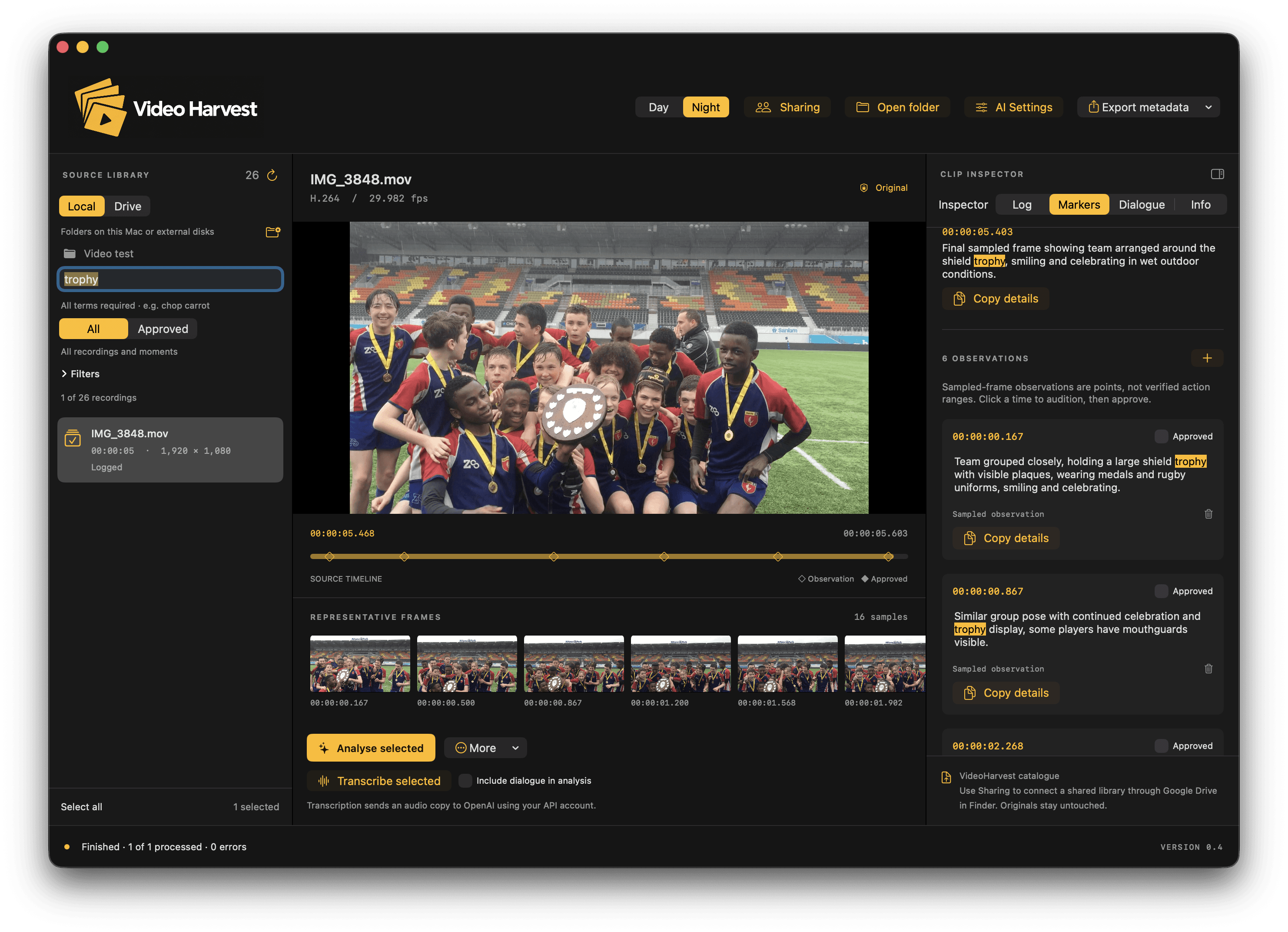
A search for “trophy” brings the clip, timeline and timestamped observations together.
Less searching. More making.

Find the shot in your own words.
Describe the footage you need, then narrow the results. Natural search connects common word variations and related subjects or actions — so ‘someone chopping carrots’ can also find a saved moment described as ‘a chef dices carrots’. Switch to Keywords when you want literal terms, filenames or exact phrases.
Search your saved catalogue
Descriptions, keywords, visual details, markers and saved dialogue, within the selected Local or Drive library and its loaded subfolders.
Make the results yours
Filter by folder/project, duration, landscape/portrait/square orientation, visual analysis, filming date, approval status and where to search.
Jump to the useful moment
Highlighted matches in Log, Markers and Dialogue link back to saved timestamps for review.
Natural search uses related English vocabulary in your saved logs. Choose one library at a time; use filters for dates and duration.
Your originals stay intact.
Analysis builds a catalogue around your recordings. It doesn’t alter your original video files.
Useful moments, marked
Timestamped markers point you towards promising moments within a recording—not just the file that contains them.
Review and stay in control
AI is a starting point, not the final word. Review descriptions and markers with your own creative judgement.
A catalogue your team can share
Share descriptions, keywords, markers, transcripts and approvals through your Google Drive library. Colleagues can search existing logs without an AI key. JSON and CSV exports remain available.
Share the details. Start the edit.
Click “Copy details” to copy the clip’s description, keywords, location and metadata — including where to find the original footage and the timestamp of the selected moment. Pass it to your editor so they can jump straight to the right shot and start creating.
Your footage. Your preferred light.
Choose a crisp Day view or a darker Night workspace. The same library, previews and clip details stay in place, so you can switch the look without interrupting your flow.
Drag the divider to compare Day and Night.


FOR THE PEOPLE WHO MAKE THINGS
Editors · Small production teams · Agencies · Marketing teams · Content Creators
EARLY ACCESS
Local footage. Shared libraries. One Mac app.
Video Harvest lets you switch between footage on your Mac or external drives and Google Drive libraries available through Google Drive for desktop. Search saved descriptions, keywords and timestamped moments in your selected library. Requires an Apple silicon Mac running macOS 14 or later.
Shared catalogues are now included: colleagues using the same Drive library can share descriptions, keywords, markers, transcripts and approvals. Google Drive for desktop handles syncing between Macs. Natural search is now available, using related English vocabulary in saved logs; switch to Keywords for literal terms and exact phrases. Try VideoHarvest Pro free for 7 days, then £12.99/month.
Signed for Mac. Notarised by Apple.
VideoHarvest is signed with an Apple-issued Developer ID and notarised by Apple. Apple checks the app for known malicious software, while macOS can verify its developer and confirm it hasn’t been altered since signing.
For Mac
FREE 7 DAY TRIAL
OVER 50% OFF
Turn folders of forgotten clips into footage you can find. Try VideoHarvest Pro free for 7 days.
Then only £12.99/month
Usual price £26.98/month
Buy it now — start free trial
£0 today. Then £12.99/month, renewing monthly until cancelled. Cancel before your trial ends to avoid being charged.
For Apple silicon Macs running macOS 14 or later. Your own OpenAI or Gemini API key is required for AI analysis; AI usage is billed separately.
A payment method is required. The free trial covers the app subscription, not AI usage.
What they say…
VIDEOGRPAHER
“Finding a shot by what is happening in it makes my old footage library feel useful again. I can get to the moment and carry on with the edit.”
Jear, Videographer
CONTENT CREATOR
“I love being able to search for a subject, check the matching moment and see which clips are worth revisiting for the next piece of content.”
Olivia, Content creator
NON-PROFIT
“A shared catalogue has helped our small campaign team rediscover the footage we already have and make more of every shoot.”
Non-profit campaign team
A few things worth knowing.
Does analysis change my original files?
No. Your original video files remain intact during analysis. Video Harvest creates catalogue details around your footage.
Can I review the AI’s suggestions?
Yes. AI-generated descriptions and timestamped markers can be reviewed. Your judgement stays at the centre of the workflow.
How does Google Drive support work?
Choose your Google Drive or Shared Drive library from Finder. Google Drive for desktop handles sign-in and syncing; colleagues choose the same library on their Macs. You can search its existing catalogue without downloading every video, although playback or analysis may download the selected clip.
What do I need to use Video Harvest?
An Apple silicon Mac running macOS 14 Sonoma or later, your own OpenAI or Google Gemini API key, and a collection of video footage you’d like to organise and search. AI usage charges are separate.
Your next great edit might already be in your archive.
FREE 7 DAY TRIAL
OVER 50% OFF
Turn folders of forgotten clips into footage you can find. Try VideoHarvest Pro free for 7 days.
Then only £12.99/month
Usual price £26.98/month
Buy it now — start free trial
£0 today. Then £12.99/month, renewing monthly until cancelled. Cancel before your trial ends to avoid being charged.
For Apple silicon Macs running macOS 14 or later. Your own OpenAI or Gemini API key is required for AI analysis; AI usage is billed separately.
A payment method is required. The free trial covers the app subscription, not AI usage.